 Tabfinity
Features
Everything the workspace can do.
Tabfinity turns Chrome's new tab into a personal browser workspace: organize bookmarks into tabs and folders, find any of it instantly, and keep handy tools one click away.
The workspace at a glance
Tabs and folders
Organize every saved site into tabs and folders.
Two searches
Search the web, or search your own bookmarks by title or address.
Clock and weather
The time, date, and local weather the moment a tab opens.
Quick notes
Capture a thought without leaving the workspace.
Backgrounds
Wallpapers, gradients, or your own image with Premium.
Seven tools
Calculator, QR codes, passwords, whiteboard, and three more.
Tabs and folders
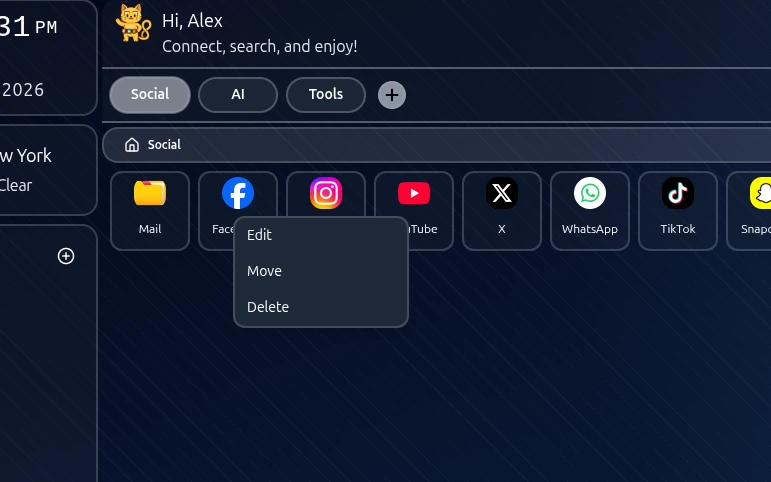
Tabs are the top level of the workspace: each one is its own set of folders and bookmarks, so work, home, and a side project can live apart from each other. Inside a tab, folders organize the saved sites; drag anything - a tab, a folder, a bookmark - to rearrange it.
Give any bookmark a custom icon and a one-line description so it reads at a glance, and reorder folders by dragging them where you want them. On the free plan folders stay flat; Premium allows folders inside folders when one level stops being enough.
- Tabs
- Independent page of the workspace, each with its own folders and bookmarks.
- Folders
- Group bookmarks inside a tab; nest folders inside folders with Premium.
- Icons and descriptions
- A custom icon and a short description on any bookmark.
- Drag to arrange
- Reorder tabs, folders, and bookmarks by dragging them.
Bookmarks, right in Chrome
The workspace is not a copy of your bookmarks - it is your bookmarks. Everything you organize lives as ordinary Chrome bookmarks inside a "Tabfinity" folder in your own bookmark tree, which is why the workspace exists whether or not you ever sign in.
Because the data is Chrome's own, Chrome Sync carries it to every computer you sign into Chrome on, and removing the extension never deletes it.
Your data lives in your own bookmark tree, not in our servers.
Search everything
The new tab answers both kinds of search: it reaches the web with suggestions as you type, and it searches your own bookmarks by title or address, showing where each result lives so you can spot the one you meant.
- Search the web
- Straight from the new tab, with suggestions as you type.
- Find any bookmark
- By title or address, with the folder it lives in shown.
Widgets for the essentials
The essentials sit on the workspace itself: the clock and date are the first thing a new tab shows, quick notes capture a thought without opening an app, and the optional weather widget keeps the forecast in the corner.
- Clock
- The time and date, in the workspace's own corner.
- Weather
- A local forecast widget, optional like every network feature.
- Quick notes
- 10 on the free plan, unlimited with Premium.
Make it yours
Pick a built-in wallpaper or one of the gradient presets to set the mood of the workspace. With Premium you can upload your own image, so the page behind your bookmarks is familiar from the first tab of the day.
The everyday tools
Beside the workspace, seven small tools open over the new tab: the calculator, QR code generator, password generator, and whiteboard are free, and Subscription Tracker, Warranty Keeper, and Prompt Collection come with Premium.
Explore the toolsWhat Free includes, and what Premium adds
See the plans- Free, forever
- 5 workspace tabs, 10 quick notes, unlimited bookmarks (folders stay flat), workspace and web search, custom icons and backgrounds, and the four free tools.
- Premium
- No limits on tabs and notes, nested folders, background image uploads, and the three premium tools: Subscription Tracker, Warranty Keeper, and Prompt Collection.
- Prices
- $2 per month or $18 per year, with a 14-day trial that needs no card.
Put your new tab to work.
Questions? Check the FAQ.